Page / 007
After2AM Viewfinder
Turn the phone you already own into a complete 4K recording system.
After2AM Viewfinder lets you monitor, control and record direct 4K video from an iPhone or compatible Android phone on your Mac. Get synchronized phone audio, remote camera controls, production overlays, a built-in teleprompter and multi-camera support—all through a private local connection.
Connect wirelessly from iPhone or Android, or use a trusted USB connection with iPhone. No cloud relay, no account and no unnecessary video re-encoding.
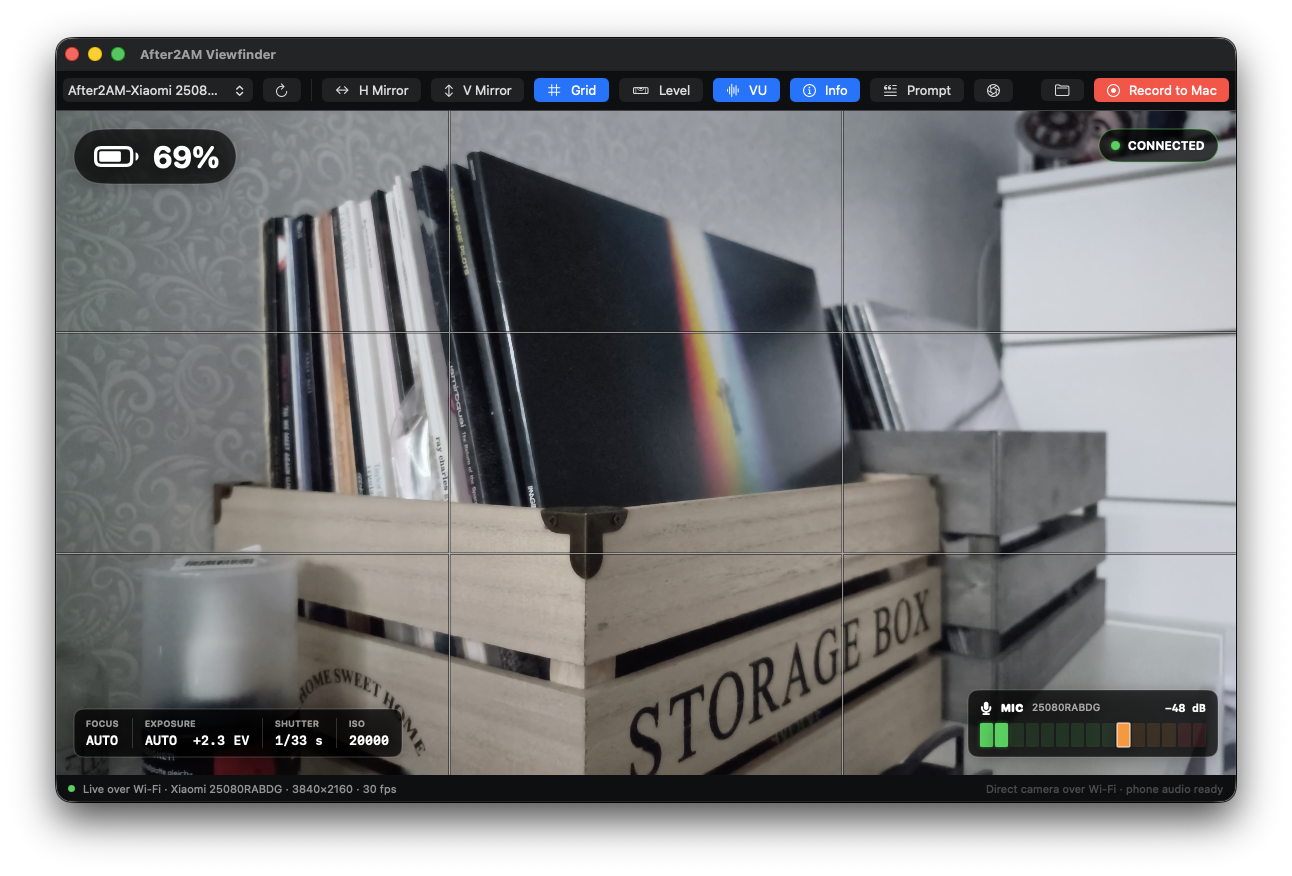
Feature list
Direct 4K recording
Capture the phone’s rear camera at 3840×2160 and 30 fps using hardware-encoded HEVC.iPhone and Android support
Use After2AM Capture on either platform with the same native macOS monitoring and recording workflow.Wi-Fi and iPhone USB connectivity
Stream over your local network or connect an iPhone with a trusted data cable for a stable wired setup.Automatic USB/Wi-Fi handoff
Viewfinder can fall back to Wi-Fi when an iPhone cable is removed and return to USB when it is reconnected.Record directly to your Mac
Save synchronized HEVC video and AAC audio as an editing-ready QuickTime MOV in the folder you choose.No second video encode
The original HEVC stream is written directly into the recording, preserving quality while reducing Mac processing overhead.Phone and external audio support
Record the phone’s active microphone input—including compatible wired and USB wireless receivers—with live level metering and mono/stereo handling.Remote focus control
Choose continuous autofocus, lock the current focus, set a repeatable manual lens position or click directly on the preview to select a focus point.Remote exposure control
Use automatic exposure, AE lock, compensation or manual shutter speed and ISO—with controls matched to the connected camera’s real capabilities.Professional monitoring tools
Check a calibratable camera level, rule-of-thirds grid, audio VU meter, battery and charging state, and live focus and exposure readouts.Customisable teleprompter
Paste in a script, adjust its appearance and roll speed, or scroll manually—all without burning the prompt into the recording.Flexible preview orientation
Phone rotation is handled automatically, with independent horizontal and vertical preview mirroring when needed.Multi-camera operation
Open a separate Viewfinder window for each phone, with independent monitoring, camera controls, teleprompter and recording.Per-camera preferences
Remember each phone’s recording destination and preferred monitoring setup between sessions.Clean recordings
Grids, meters, telemetry, mirroring and teleprompter text remain monitoring-only and never appear in the finished movie.Private by design
Video, audio and telemetry travel directly between phone and Mac. There is no cloud upload, account, analytics or duplicate recording stored on the phone.
Distribution
After2AM currently uses direct website distribution for the macOS Viewfinder and Android companion. The iPhone companion remains a source/Xcode install until Apple distribution is available.
After2AM Viewfinder for Mac
Requires macOS 14 or later. The universal download supports Apple silicon and Intel Macs.
This independent build is ad-hoc signed but is not notarized by Apple. macOS will block its first launch until the user explicitly approves it:
1. Download and expand the ZIP, then move After2AM Viewfinder to Applications.
2. Try to open the app once and dismiss the Apple security warning.
3. Open System Settings → Privacy & Security and scroll to Security.
4. Click Open Anyway, authenticate, and confirm Open.
The override is available for about an hour after the first launch attempt. Only override the warning for a download obtained from the official After2AM website. Apple documents the same procedure in Open an app by overriding security settings.
To verify the downloaded archive in Terminal, run:
shcd ~/Downloadsshasum -a 256 -c After2AM-Viewfinder-0.8.2-macOS-universal-unnotarized.zip.sha256The checksum file must be downloaded to the same folder as the ZIP.
After2AM Capture for Android
Requires Android 10 or later and a phone with rear-camera and hardware HEVC support for 3840×2160 at 30 fps.
1. Download the APK from the official After2AM website on the Android phone.
2. Open the download. If Android blocks it, allow Install unknown apps for the browser or file manager used to open it, then return to the APK.
3. Tap Install, launch A2AM Capture, and grant its requested Camera, Microphone, Local Network, and sensor permissions.
The first public release cannot be installed over an older Android Studio debug build because the certificates differ. Uninstall the debug build once, then install the public APK. Later public APK releases use the same permanent certificate and install normally as updates; do not uninstall between those updates.
To verify the APK after downloading it to a Mac, run:
shcd ~/Downloadsshasum -a 256 -c After2AM-Capture-0.1.0-Android.apk.sha256get to know the app
User manual on https://docs.after2am.dev/viewfinder/